
How To Save Money on Amazon
Like me, you probably have an Amazon Prime membership. I have been using Amazon for over 20 years and I have learned how to use it to maximize my savings from my membership, find the best deals, and read the fine print.
MEMBERSHIP
Decide What Membership is Best
There are three different Amazon Prime memberships:
Government assistant/EBT
Student
Family
If you are on government assistance/EBT, or a student, you can receive 50% off your membership. You will need to provide proof that you are either of these statuses to receive the discount for up to 4 years. The student discount is only for one individual and not a family. The family membership is for two adults who live at the same primary address and you can add up to four children profiles.
Pay for Your Membership In Full

While the 30-day trial can sound enticing, after the trial period, Amazon will charge you per month. If you plan on being with Amazon long term, it may be best to pay for a full year in advance, or mark a day on your calendar before your free trial ends so you can switch to a yearly subscription. When you pay for the full year versus month to month, you are saving over $40 for a family membership.
Know What Is Included In Your Membership
Most people only using their Amazon Membership for shopping, but there is so much you can utilize. Here is what is included:
Amazon Fueling – You can save 10 cents per gallon at participating BP, Amoco, and AMPM gas stations. You will need to download the app called "Earnify" and follow the prompts to link your Amazon account. Every Friday they have a special promotion with even more savings!
Amazon Photos and Amazon Drive – Unlimited photo storage and up to 5GB of video storage. Click here to learn more.
Amazon Music – Over 100 million songs and podcasts. Some podcasts may have ads.
Amazon Video – Selection of movies and TV-shows.
Prime Reading – Unlimited access to rotating catalog of ebooks, audio books, magazines, and comic books.
Amazon Luna – Free online rotating library of games. You can set parental controls.
Grubhub+ - Free delivery on food orders with lower service fees and exclusive savings. If you spend more than $50 (as a net total) there will be no delivery or service fees.
Whole Foods Market - You get an additional 10% off all sales items and two to three special deals each week with up to 40% savings.
FINDING THE BEST PRICE
Tracking Prices
Prices on Amazon change daily. In order to get the best deal, you should be using CamelCamelCamel, a website that tracks prices for you. Click here for the link. When you sign up for CamelCamelCamel, you need to provide an email address. They use the email address to send you notifications when there is a price drop of products you are tracking. When you are searching products you want to track, only type in a few words in the search bar. (Don’t copy and paste from Amazon otherwise; it won’t come up.) You can also click on the item to see the price history in the past year. This site is incredibly helpful and insightful.
Subscribe and Save
Another way to save money on Amazon is using their Subscribe and Save. When you want to buy a product you can choose to buy it now, or Subscribe and Save for a lower price and have it shipped later. When you Subscribe and Save you can save between 5%-15% per product. To unlock the maximum 15% savings, you will need to have 5 or more items arriving on the same day. There is no commitment with Subscribe and Save, therefore, you can cancel anytime. For example, you if you want to buy a product once, you may purchase it using Subscribe and Save and then cancel it after you received the product. If this is your intention, I suggest you Subscribe and Save for the 6-month period just in case you forget to unsubscribe. Amazon will also send you an email before items get shipped so you can skip or cancel. Not all items are available for Subscribe and Save, but if they are, you can find it on the right side of the page as shown in the example below.

Check Other Sellers
When you are looking at a product page, you can see if there is a lower price from another seller. This information is located on the bottom right under the Subscribe and Save.
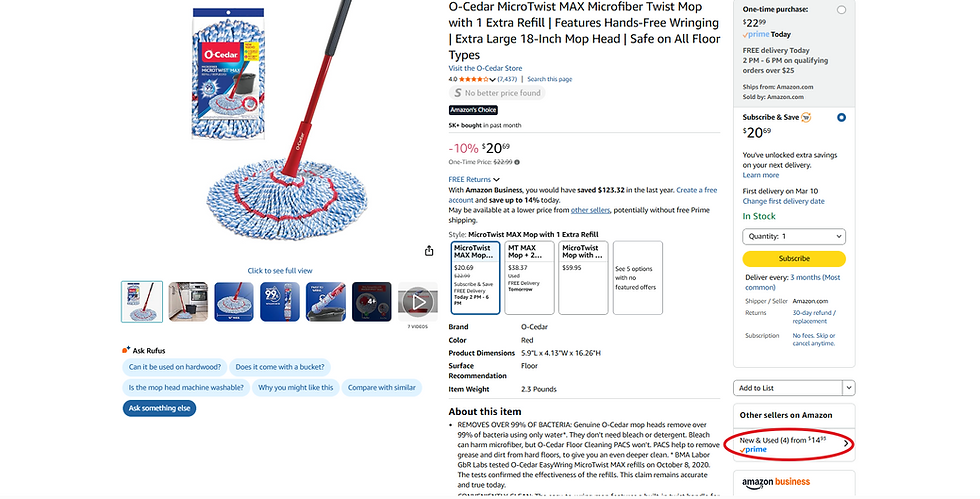
When you click on the other sellers you can see what they are offering such as what condition the product is in, details of the condition, and the price. If you are using the product yourself and you don't care if it comes in the original packaging, but is still practically brand new, you could save money on your purchase.
Today’s Deals
Today’s Deal are exactly what they are: special deals that are only for a day. You can access Today's Deal in two ways. One way is you can find it on your homepage as shown below.

The second way is to find them on the left hand side of the screen when you are looking for a product. For example, I typed in "coffee" in the search bar. When I see the results of the coffee products, on the left side of the screen as shown below, I can click on "Today's Deals" specifically for coffee. It will then show me all the "Today's Deals" on coffee.

Lightning Deals
Lightning Deals are like Today's Deals but with one difference: Lightning Deals are for a limited amount of time. When you see a count-down bar this indicates it is a Lightning Deal. Lightning Deals will also have a claim percentage bar. The Lightning Deal will end when either the claim percentage bar reaches 100% or the timer gets to zero, which ever is first. So hop on those Lightning deals especially when those claim bars are at least 80% because they are going fast!
Below is an example of pillow inserts that show both a Today's Deal and a Lightning Deal. You will see the Lightning Deal will have a count-down and the Today's Deal (aka Limited Deal) does not.

When you click on the pillows on the far right, it confirms it is a Lightning Deal and it tells you how much product has been claimed.
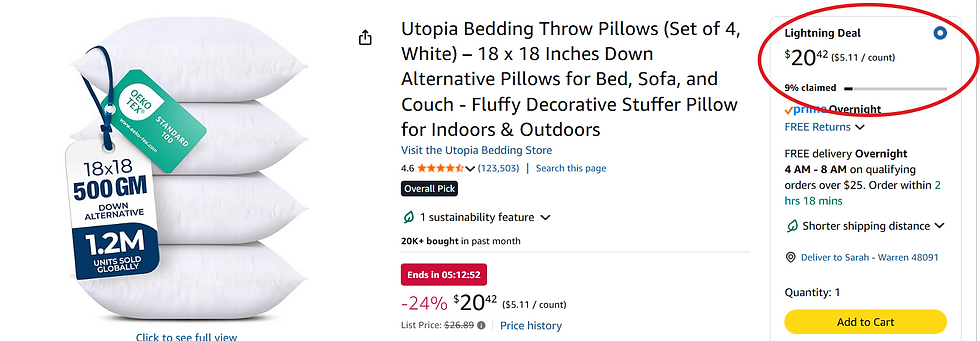
You can find Lightning Deals on the "Today's Deal" page, or by filtering to Today's Deals on the far left when you are searching for a product.

Choose A Different Variety
If you are not too picky, choosing a different color, flavor, amount, scent, etc. can help you save money on Amazon. For example, look at these men’s sweatshirts. Some colors are more than others. The blue one for example is $16.99 while the brown is only $8.99; that is almost 50% savings! Okay, so if you don't like brown, there are other colors that are cheaper such as the beige for $11.41. Still, great savings if you look at other colors and variety options.

SECRET PAGES

When you are shopping on Amazon there are some “secret pages” you should know about. Some can be found on the home page, but others are harder to find unless you know where to look.
Amazon Outlet
The Amazon Outlet typically has overstock, clearance, and end-of-season products at discounted prices. Click here for the link or you can find the Amazon Outlet on Today's Deals Page.

Amazon Resale
Amazon resells used products. All their items are inspected and then sold at a discount. You can find the resale page by clicking on the dropdown menu on the search bar, on the Today's Deal page, or by clicking here .

You can also see Amazon Resale on a product page. On the bottom right, you see “Save with Used” as a cheaper option. Since it is a resale item, you don’t get the manufactured warranty, but it is backed by Amazon’s 30-day return policy unless it is a final sale item.

Amazon Renewed
Amazon Renewed takes used products and refurbishes them back to "like-new". These products can be found under the Today's Deal page or by clicking the link here. Amazon Renewed has a 90-day return policy for most items (otherwise it is the 30-day) and has a 365-day return policy for automotive.

Less Than $10
Amazon has a special page of thousands of items that are under $10 or less. This can be incredible helpful to find items within budget or for gifts. Click here for the link or you can find it on the drop-down menu from the search bar.
COUPONS AND STACKING
Clipping Coupons
When you scroll through products, if you see these green deals that are highlighted, these are Amazon's coupons. These coupons can be a percentage off, a dollar amount off, discount when you buy more than one qualifying item, or a special price.

You can also find coupons through the Today's Deals page at the top or when you scroll through all the different catergories as shown below.

It is very important when you want to use these coupons that you "clip them" by clicking on the coupon on the product page so the coupon can be applied to your cart. If you don't, you will not see the savings in check-out.
Coupon Stacking
Sometimes, you will find there will be opportunities for coupon stacking. For example, there could be a clipped coupon that you can apply in addition to a Subscribe and Save. Below is an example of coupon stacking. For example, I got the Subscribe and Save price with a digital coupon. When the coupon says "First Subscribe & Save order only" it is referring to that product, not your other subscriptions.

This deal gives will give me $10 off the original price, plus the Subscribe and Save savings for a total of $16.09, which is 45% off the original price!

Secret Digital Coupons
While Amazon does have coupons that can be clipped, there are secret digital codes for products that you will not find on Amazon's website. You can find them on a website called Koupon.ai. Here is the link. You can search for items on their website and filter to "promo codes." Then the site will take you directly to Amazon and you can add the coupon code to your cart. In my experience, these digital coupon codes work about 90% of the time. If one doesn't work, try searching for a similiar item on the site.
PAYMENT
Get the Amazon Credit Card

The Amazon Credit Card is one of the best credit cards on the market. If you are an Amazon Prime Member, you get 5% cash back on all your Amazon, Whole Foods, Audible, and Amazon Fresh purchases, Shopbop, and Chase Travel. You can also earn 2% cash back at restaurants, gas stations, local transit and commuting and 1% on all other purchases.
You can also earn at least 10% cash back on rotating items. You will have to use this link here to periodically check because you will not find these deals listed on individual product pages. The cash back you receive is instanteous on your Amazon account and it is very easy to apply it in check out just by clicking "apply."
You also get additional benefits with some restrictions such as: Auto Rental Coverage, Baggage Delay Insurance, Extended Warranty Protection, Lost Luggage Reimbursement, Roadside Assistance, Travel Accident Insurance, Travel and Emergency Assistance, and Purchase Protection. If you want to sign up for the Amazon Prime Credit Card, use my link here and you will receive $150 Amazon gift card for signing up (I might benefit monetarily).
Tax Exemption
Companies that are a 501(c)3 non-profit get tax exemption at retailers, and Amazon is no different. However, in other circumstances, you may qualify for an individual tax exemption. To know if you are eligible for a tax exemption click on the link here and it will tax you to the Tax Exemption Wizard to see if you qualify. Below is a screenshot of who may qualify.

Amazon Shoppers Panel

The Amazon Shoppers Panel is an app that gives you money for scanning or emailing receipts from retailers that are not Amazon or one of their affiliate companies. You can earn up to $10 per month in uploading receipts and at the end of the month, this credit will automatically be in your Amazon account. You can also complete surveys for additional cash and they only take less than a minute to complete.
PROMOTIONAL CREDITS
No Rush Shipping
When you are checking out, sometimes there will be an option for No-Rush Shipping that will give you a promotional reward. Sometimes, this can be 6% cash back using the Amazon Prime Credit Card (instead of the 5%), an instant discount off the item, or a promotion credit ranging from $1 to $5. This will only be available to you when you check out on some products. If you do see it, it can be a good option if you are not in a hurry to receive the item.
Compensation for Late Delivery

Only once your item has been delivered can you request compensation if it is delivered late. This applies to Amazon, Whole Foods or Amazon Fresh deliveries. To keep track if an item is delivered late, make sure you keep your email receipt of when you purchased the item and its expected arrival. Amazon will update your order in your account if the delivery date changes, so that is why it is important you keep your original email or take a screenshot of the delivery date when you check out.
If your order arrives late, you want to call Amazon at 888-280-4331. When you call, make sure you skip the prompts so you can talk to a human being. When you get someone on the phone, you will need the last four digits of your order number, tell them you have received the item but it was late, and you want compensation. The compensation will depend on the amount of the purchase, but you can expect to get at least a $5 promotional credit on your Amazon account to use on future purchases.
Call Customer Service Per Issue To Receive Promotional Credits

If you need to call customer service, make sure you only call once per issue. I know that doesn’t sound as efficient, but in my experience if you call about 2 or more issues, they are more likely to only help you with one issue but not the other. For example, if you have two recent orders that arrived late and you tell customer service about both, they will likely only give you one promotional credit. But if you make two seperate phone calls you will get two promotional credits. I know this might not sound very efficient, but I never have to wait to get someone to take my call and the additional promotional credit is worth it.
Call Amazon For Superb Customer Service Experience
Amazon will literally help you on any issue and will make it right. For example, I had my order shipped to the wrong address. I have no idea how it happened, but my Subscribe and Save orders, one of which was my almond milk, went to my friend instead of me. But I had no almond milk and I had to put in an order for it arrive the next day, which meant I did not get the Subscribe and Save savings. I called Amazon to explain the issue and I had a superb experience. They completely refunded me my order that went to my friend and since I had to forego the Subscribe and Save savings on my almond milk, they said they would refund me the difference, which I was happy about. They advised me to call after I received my almond milk so that they could give me the difference, but they decided to refund my almond milk for me.


Excellent article! An unbelievable wealth of information....I will be making a hard copy of the article and keeping it next to my computer